
PC & Console Gaming
Best Budget Gaming PC Builds Under $1000 – Powerful & Affordable Picks

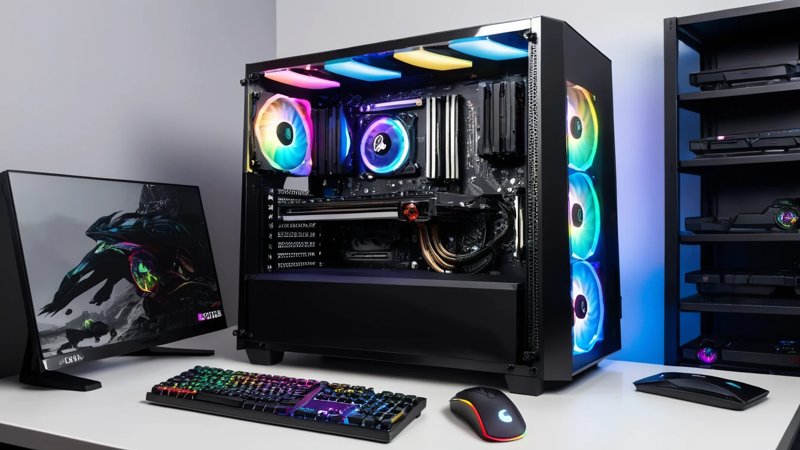
Best Budget Gaming PC Builds Under $1000 for smooth 1080p and 1440p gaming. Compare parts, performance, and value to choose the right build for your needs.
The best budget gaming PC builds under $1000 offer strong performance for 1080p and even 1440p gaming. By selecting the right GPU, CPU, and components, you can build a powerful, future-ready system without overspending.
Best Budget Gaming PC Builds Under $1000
Have you ever wondered if you really need to spend thousands of dollars to enjoy smooth and immersive gaming? The truth is—you don’t. With smart part choices and a bit of planning, you can build a high-performance gaming PC under $1000 that handles today’s top titles like Fortnite, Apex Legends, Valorant, and Cyberpunk 2077 without breaking a sweat.
The key is knowing which parts matter most—and where you can safely save money without sacrificing performance. That’s exactly what we’re going to walk through in this guide.
Let’s break down the best budget gaming PC builds under $1000, why they work, and how to customize one to fit your gameplay style and future upgrade plans.
🖥️ Understanding What Makes a Good Budget Gaming PC
A strong gaming PC doesn’t require the most expensive hardware. What matters is balance. The GPU and CPU should complement each other. Too much power in one and too little in the other leads to bottlenecks.
Here’s what affects gaming performance most:
- Graphics Card (GPU): Handles in-game visuals and frame rate.
- Processor (CPU): Manages game logic and background tasks.
- RAM: Helps with multitasking and smooth gameplay transitions.
- Storage: Impacts how quickly games load.
- Motherboard: Determines upgrade potential.
A budget gaming PC focuses on getting the best GPU first, then pairing it with a capable CPU.
🎮 Why $1000 Is the Sweet Spot for PC Gaming
Under $700 builds exist, but they may require compromises. Around $1000, you start unlocking:
- Smooth 1080p ultra and 1440p high gameplay
- Future-proof performance for upcoming releases
- Strong multitasking (streaming + gaming at same time)
You get performance comparable to a PlayStation 5 or Xbox Series X, but with MODS, better controls, and upgrade freedom. 😄
⚙️ Best Budget Gaming PC Build Under $1000 (AMD Focused)
This build offers exceptional gaming performance at the lowest price point while still staying upgrade-friendly.
| Component | Model | Approx Price |
| CPU | AMD Ryzen 5 5600 | $125 |
| GPU | AMD Radeon RX 6700 XT | $310 |
| RAM | 16GB DDR4 (2×8GB, 3200MHz) | $45 |
| Storage | 1TB NVMe SSD | $55 |
| Motherboard | B550 ATX Motherboard | $105 |
| PSU | 650W 80+ Bronze | $60 |
| Case | Airflow ATX Mid Tower | $55 |
| Total | ≈ $755–$820 | ✅ Way under $1000 |
This build delivers 120+ FPS in most competitive games and 60–90 FPS in AAA titles on high settings.
🚀 Best Budget Gaming PC Build Under $1000 (NVIDIA Focused)
Prefer NVIDIA for better ray tracing or specific game optimizations? Here’s a great balanced build:
| Component | Model | Approx Price |
| CPU | Intel Core i5-12400F | $160 |
| GPU | NVIDIA GeForce RTX 3060 12GB | $290 |
| RAM | 16GB DDR4 (2×8GB, 3200MHz) | $45 |
| Storage | 1TB NVMe SSD | $55 |
| Motherboard | B660 Motherboard | $115 |
| PSU | 650W 80+ Bronze | $60 |
| Case | High-Airflow Mid Tower | $50 |
| Total | ≈ $915–$945 | 🎯 Under $1000 and balanced |
This setup excels in ray tracing and DLSS performance boosts.
💡 Prebuilt vs. Custom Build: Which Is Better?
If you’re new to PC building, prebuilt systems may seem easier. However, you often pay $150–300 more for the same performance.
Building your own PC gives you:
- Better part quality
- Full upgrade freedom
- Lower cost for the same power
Still, prebuilt is fine if:
- You want a no-hassle setup
- You’re nervous about handling electronics
- You don’t want to troubleshoot hardware issues
🧩 How to Choose the Right GPU for Your Gaming Style
A GPU is the heart of gaming performance. Pick based on your resolution:
| Gaming Resolution | Recommended GPU | Performance Expectation |
| 1080p (High FPS) | RX 6600 / RTX 3060 | Smooth competitive gameplay |
| 1440p (Balanced) | RX 6700 XT / RTX 4060 | High details stable framerates |
| 4K (Entry-Level) | RTX 4070 | Playable, but costs above $1000 |
If your goal is high FPS Esports, prioritize FPS over visual detail.
🔥 Best CPUs for Budget Gaming PCs
Choose a CPU that doesn’t bottleneck the GPU.
- Ryzen 5 5600 – Best value for most builds
- Intel i5-12400F – Strong multitasking and future upgrade path
- Ryzen 5 7600 – Best if planning AM5 long-term upgrades
Avoid overspending on CPUs—games rely more on the GPU.
🏗️ Motherboard & Upgrade Path
Your motherboard determines how long your system lasts. The better the chipset, the better the upgrade potential.
For AMD:
- B550 = best value
- X570 = advanced, more expensive
For Intel:
- B660 → best for 12th/13th gen CPUs
- Z boards only needed for overclocking
🧠 RAM: Why 16GB Is the Sweet Spot
8GB is no longer enough.
16GB (2×8GB) is perfect for gaming and light streaming.
If you plan to:
- Stream heavily
- Do video editing
- Run mods
Then choose 32GB.
⚡ Storage: SSD vs. HDD
Always get an SSD. HDDs are slow and outdated for gaming.
- NVMe SSD = fastest loading times
- 1TB is the current recommended space
Games like Warzone and GTA V are huge, so don’t go smaller if possible.
🌀 Case & Cooling for Better Performance
A high airflow case can improve FPS by keeping the GPU cooler.
Look for:
- Mesh front panel
- Room for 2–4 case fans
- GPU clearance length
Good airflow = quieter PC + longer lifespan.
🔌 Power Supply: Don’t Cheap Out
Your PSU protects everything in your PC.
Choose:
- 80+ Bronze or better
- 650W for most mid-range builds
Avoid no-name brands. They can fail and cause costly part damage.
🛠️ Is Building a PC Hard? (Short Answer: Nope)
It’s like high-tech Lego.
Everything only fits where it’s supposed to.
Watch a build video while you follow along, and take your time. You’ll do great. ✨
🏁 Conclusion
Building a budget gaming PC under $1000 is not only possible—it’s one of the smartest ways to get strong, upgradable performance without overspending. By investing in the right GPU, pairing it with a balanced CPU, and choosing reliable parts, you can create a gaming setup that handles everything from competitive shooters to visually stunning AAA titles.
You don’t need to compromise. You just need to choose wisely.
Build smart. Game hard. Enjoy every frame. 🎮🔥
✅ FAQs
- What is the best budget gaming PC build under $1000?
A Ryzen 5 5600 paired with an RX 6700 XT delivers the best overall value, strong 1080p/1440p performance, and future upgradability. - Can a $1000 gaming PC run AAA games?
Yes. Most AAA games will run 60–120 FPS on high settings at 1080p or 1440p depending on the GPU you choose. - Is Intel or AMD better for budget gaming?
Both are great. AMD is often cheaper and better for long-term socket support, while Intel excels in raw single-core performance. - Should I get 16GB or 32GB RAM?
16GB is enough for gaming. Choose 32GB only if you stream, edit videos, or run heavy multitasking apps. - Is it cheaper to build or buy a gaming PC?
Building is usually $150–300 cheaper and gets you better quality parts, making it the smarter choice for most gamers.

How to Optimize Your Phone for Smooth Gaming Performance – Powerful & Easy Tips

Esports Players Train Like Athletes: Peak Performance Secrets

Spider-Man 2 Review – Next-Gen Action Masterpiece Explained

Biggest Gaming Announcements From The Latest Game Awards – Exciting Highlights & Reveals

10 Common Gaming Mistakes New Players Make – Smart Fixes & Tips
10 Common Gaming Mistakes New Players Make – Smart Fixes & Tips
Biggest Gaming Announcements From The Latest Game Awards – Exciting Highlights & Reveals

PUBG Mobile vs COD Mobile: Ultimate Comparison Guide (Best Choice!)
Spider-Man 2 Review – Next-Gen Action Masterpiece Explained
Esports Players Train Like Athletes: Peak Performance Secrets
-

 Gaming Tech & Accessories2 months ago
RGB Keyboards: Top 7 Picks for Gamers (Powerful & Stunning)
-

 Gaming Guides & Tips2 months ago
How to Rank Up Fast in Apex Legends — Pro Tips for Winning Fast
-

 Gaming News2 months ago
PlayStation vs Xbox: Ultimate Showdown Guide
-
 PC & Console Gaming1 month ago
PS5 Pro vs Xbox Series X: Ultimate Comparison Guide for Gamers (Powerful & Clear)